Deposits Due · Wedding vendor deposit tracker
One sheet for every wedding deposit.
A 3-tab spreadsheet for Excel or Google Sheets, with a 3-page setup guide. Share it with your partner and see who's paying each vendor.
$19 USD · One-time purchase
Money You're Owed digital products carry a 30-day money-back guarantee. If you are not satisfied, email [email protected] within 30 days of purchase for a full refund, no questions asked. This refund policy does not guarantee any recovery outcome.
Checkout on Whop.
Who it's for, and who it's not
It's for you if
- You're a US couple tracking wedding or event vendor deposits and balances.
- Parents are chipping in and you want to see who's paying each vendor.
- You're happy in Excel or Google Sheets and want one copy you both edit.
It's not for you if
- You want your landlord to return a rental security deposit. That is a different tool: see Deposit Defender.
- You want an app that connects to your bank or sends reminder emails. This sheet shows what you type in.
- You want financial, legal or tax advice, or someone to read your vendor contracts for you.
Looking for a landlord security-deposit tool? Deposits Due is not it. Deposit Defender is our free rules-based analysis of a US renter's security-deposit deductions, with a $29 demand letter. Deposits Due only tracks the deposits and balances you owe your wedding vendors.
“When is the florist's balance due, and who's paying it?”
Every vendor has its own quote, its own deposit and its own balance date. The venue wants one amount now and the rest later. The caterer's deposit is due on a different day. One set of parents is covering the photographer, and you are splitting the band.
The details sit in separate contracts and emails, and you and your partner each keep your own notes. Emailing a file back and forth creates two versions that drift apart.
Deposits Due puts every vendor on one row in one shared copy, so the next payment and the person paying it are in front of both of you.
What's inside
Two files in the download.
deposits-due.xlsxOne workbook with 3 tabs, for Excel or Google Sheets.
- Deposits Due: 50 vendor rows for quote, deposit, balance, due dates, who's paying, status and notes, with a budget summary on top.
- Due in 30 Days: your next 15 payments, earliest first, with overdue dates flagged, plus spent vs budget.
- Guest List: 250 rows for name, side, RSVP, meal and notes.
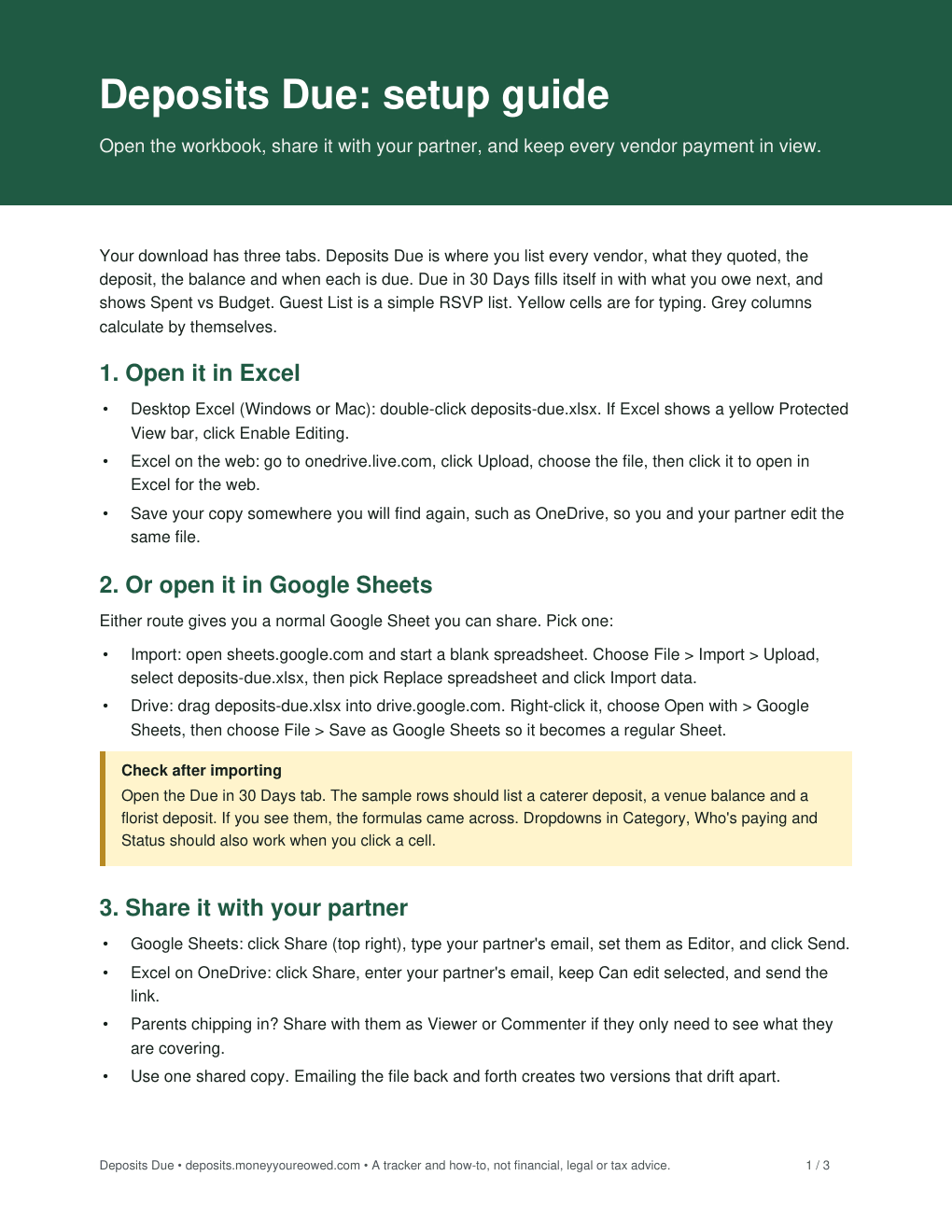
deposits-due-guide.pdfA 3-page setup guide: opening the workbook, importing it into Google Sheets, sharing it and filling in your vendors.
You need Excel or Google Sheets, plus a PDF reader for the guide.
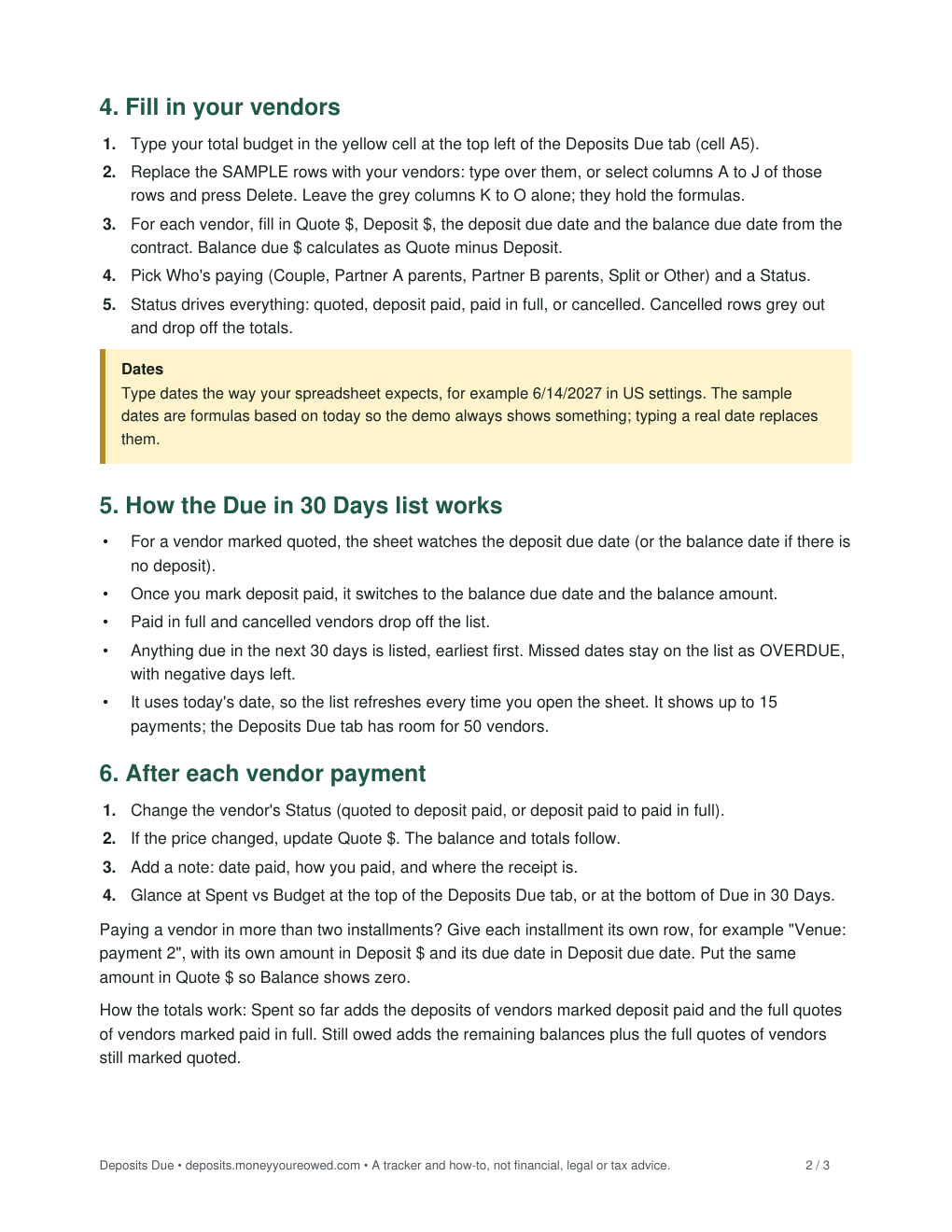
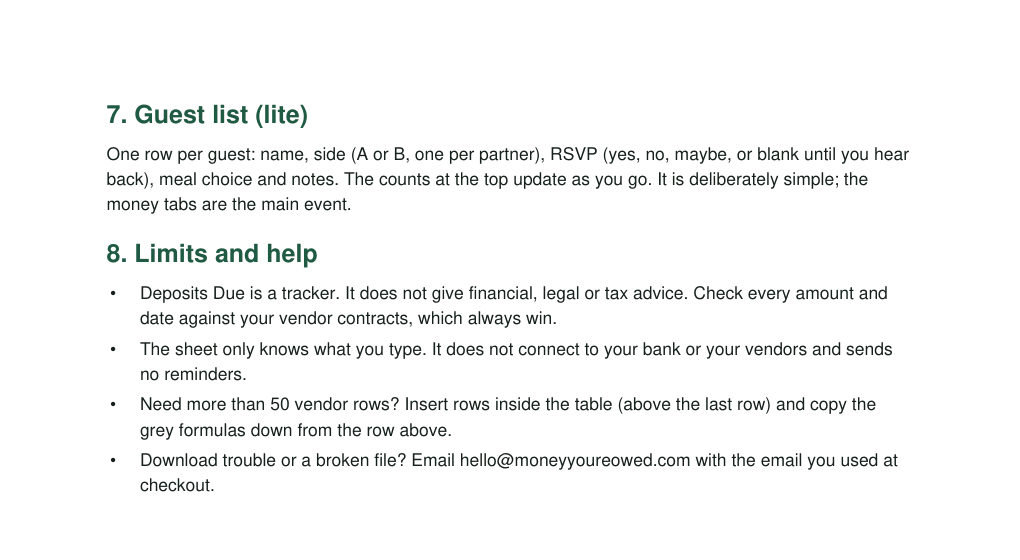
These are real pages from the PDF guide in the download, not a customer result. Select a page to see it full size.
What you have when it's set up
- One sheet you and your partner both edit, instead of two sets of notes.
- Every vendor's quote, deposit, balance and due dates on one row, with who's paying.
- A Due in 30 Days list that refreshes each time you open the sheet, earliest payment first, with missed dates marked overdue.
- Spent so far and still owed, next to the budget you typed in.
- A simple guest list for RSVPs and meal choices, with counts at the top that update as you go.
The sheet only knows what you type. It does not save you money or pay anyone for you.
No reviews yet. Here is what you can check instead.
Deposits Due is new on Whop and has no reviews yet, so we are not going to show you any. What you can check before buying:
- The real pages. The pictures on this page are pages from the PDF guide in the download.
- How it works. Yellow cells are for typing. Grey columns calculate by themselves. Balance due is the quote minus the deposit. Status (quoted, deposit paid, paid in full or cancelled) decides what shows on the Due in 30 Days list, and cancelled rows drop off the totals.
- Who made it. Money You're Owed, a trading name of Aussie-AI Ltd, a company registered in England & Wales (company no. 17193460). Contact: [email protected].
Deposits Due is a tracker and how-to, not financial, legal or tax advice. Check every amount and date against your vendor contracts, which always win.
The price
$19 USD, once
One payment for both files. No subscription.
Money You're Owed digital products carry a 30-day money-back guarantee. If you are not satisfied, email [email protected] within 30 days of purchase for a full refund, no questions asked. This refund policy does not guarantee any recovery outcome.
Questions
Is this the same as Deposit Defender?
No. Deposit Defender is for US renters whose landlord kept a security deposit: a free rules-based analysis of the deductions, plus a $29 demand letter. Deposits Due is a spreadsheet for couples keeping track of the deposits and balances they owe wedding or event vendors. It does not help you get any deposit back.
Does it work in Excel and in Google Sheets?
Yes. Open deposits-due.xlsx in desktop Excel or Excel on the web, or import it into Google Sheets. The guide walks through both, and tells you what to check after importing so you know the formulas and dropdowns came across.
Does it connect to my bank or send reminders?
No. There is no bank connection and there are no reminder emails. It does not connect to your vendors either. The sheet shows what you type in, and the Due in 30 Days list updates when you open it.
Can parents see it without changing it?
Yes. The guide shows how to share the sheet with your partner as an editor, and with parents as Viewer or Commenter if they only need to see what they are covering.
What if I have more than 50 vendors, or pay in installments?
The guide covers both. You can insert rows inside the table and copy the grey formulas down. For a vendor paid in more than two installments, give each installment its own row.
What happens after I pay?
The buy button takes you to Whop, where you check out and pay. The download is available straight after checkout. If you have download trouble or a broken file, email [email protected] with the email you used at checkout.
Is this financial or legal advice?
No. Deposits Due is a tracker and how-to, not financial, legal or tax advice. Your vendor contracts decide the amounts and the dates.
Get the sheet and fill in your first vendor.
Deposits Due · $19 USD once · from Money You're Owed
Money You're Owed digital products carry a 30-day money-back guarantee. If you are not satisfied, email [email protected] within 30 days of purchase for a full refund, no questions asked. This refund policy does not guarantee any recovery outcome.
Questions before you buy? Email [email protected].